In this post we are going to discuss [1] how to create a directory, [2] create multiple directories at once, [3] create a directory inside a directory which does not exist.
Create a directory
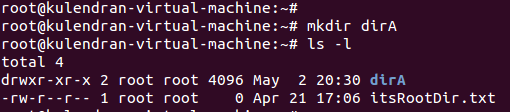
#mkdir <directory name> command will create a directory. You can check it by issuing ls command.
I created a directory called dirA, then its seen by ls cmd.
Create multiple directories at once
#mkdir <directory name1> <directory name2> . . . . . command will create multiple directories at once in the same directory. Note the directory names are seperated by space.
I created 3 directries namely dirB, dirC and dirD.
Create a directory inside another that does not exist
#mkdir -p <non existing directory>/<directory name> command will create a directory inside non existing directory. Note the directories are seperated by / forward slash.
I created dirF inside dirE which does not exist. Verify it by ussuing ls command.
Summary
#mkdir a
#mkdir a b c d
#mkdir -p a/b
tags: create directory, mkdir, mkdor -p, multiple directories, linux, unix, fedora, unbuntu, rhel7, redhat, rhcsa, rhce, system adminsitrator, system engineer, india
We have seen how the directories and files are organized in Linux in last post. Today we are going to learn how we refer a particular file or directory in 02 ways.
Absolute path
Always begines at / and ends at a single file specifying all directories and subdirectories between them.
for example, the absolute path for message file is
/var/log/messages
Relative path
A path related to your working directory.
for example, the relative path for message file for a user in var directory is
log/messages
Summary
Absolute path: starts from root
Relative path: starts from working directory
tags: absolute path, relative path, linux, ubuntu, fedora, redhat, rhcsa, system admin, engineer, programing, cd, india